Step-by-step guide to filing your annual CIT or PIT tax return on the NRS Self-Service Portal. Deadlines, documents, payment, and Tax Clearance Certificate explained.
Every Nigerian taxpayer is required to file annual tax returns — yet thousands of businesses and individuals miss their deadlines each year because they do not understand who files where, what documents are needed, or how the NRS Self-Service Portal actually works. The Nigeria Tax Administration Act 2025 (NTAA) made electronic filing mandatory and introduced stiffer penalties for late or incorrect submissions.
Whether you are filing a Company Income Tax return, a Personal Income Tax return, or an employer’s annual PAYE summary, this guide takes you from login to submission — with the exact deadlines, documents, and portal steps you need to get it right.
| Detail | Summary |
|---|---|
| NRS Self-Service Portal | selfservice.nrs.gov.ng |
| Tax ID Portal | taxid.nrs.gov.ng |
| CIT annual return deadline | Within six months after the end of the company’s accounting year |
| PIT annual return deadline (individuals) | 31 March of the following year |
| Employer PAYE annual return | 31 January of the following year |
| NRS helpline | 02094602700 |
First: Understand Where You File
This is the single biggest source of confusion in Nigerian tax filing, and getting it wrong means your return is not received by the correct authority. The NRS Self-Service Portal handles federal tax obligations. State Internal Revenue Services handle state-level personal income tax. Here is the split:
File on the NRS Portal (selfservice.nrs.gov.ng)
- Company Income Tax (CIT) annual returns — all registered companies
- VAT returns — monthly, for VAT-registered businesses
- Withholding Tax returns — monthly and annual, for companies deducting WHT
- Petroleum Profits Tax returns — for upstream oil and gas companies
- Stamp Duties — where applicable to corporate transactions
- Personal Income Tax for specific categories — military officers (Armed Forces), Nigeria Police Force officers, Nigerian Foreign Service officers, and non-resident persons
File With Your State Internal Revenue Service
- Personal Income Tax (PIT) annual returns — for all other individuals (employees, self-employed, freelancers)
- PAYE-related individual returns — filed in the state where you reside
If you are a salaried employee living in Lagos but working for an Abuja-based company, your individual PIT annual return goes to the Lagos State Internal Revenue Service (LIRS) — not the NRS, and not the FCT Internal Revenue Service. Your state of residence determines the filing authority, not your employer’s location.
Many state revenue services now have their own digital portals (LIRS has etax.lirs.net, for example). If your state has an online portal, use it. If not, you may need to file at the physical tax office.
This guide focuses on the NRS Self-Service Portal — primarily for company returns and the federal-level obligations listed above. The principles of preparation, documentation, and compliance apply equally to state-level filings.
What You Need Before You Start
Attempting to file without your documents ready is a recipe for an abandoned session, a half-completed return, and a missed deadline. Prepare everything before you log in.
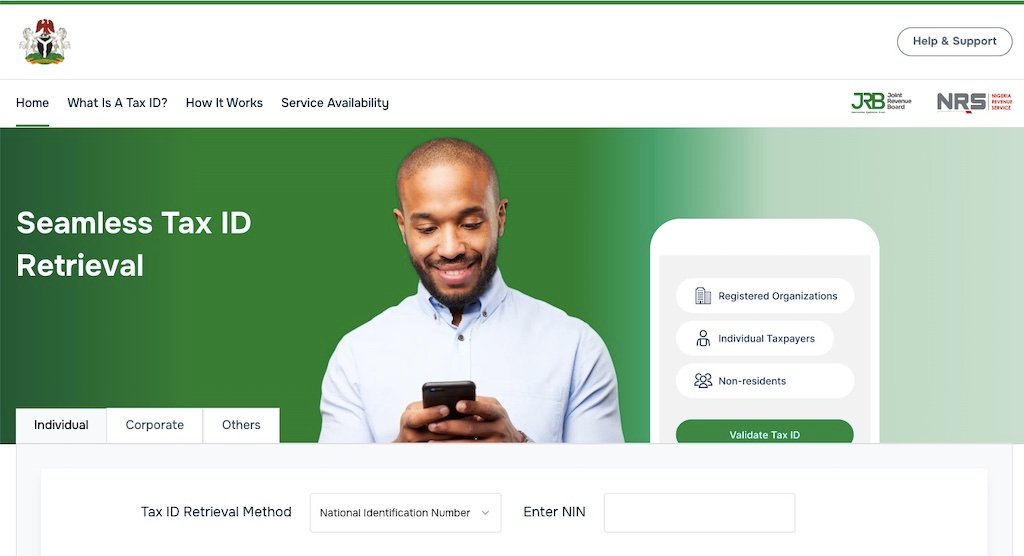
Your 13-Digit Tax ID
You cannot access the NRS portal without a verified Tax Identification Number. Since January 2026, the system has been simplified: your NIN serves as your individual Tax ID, and your CAC registration number serves as your corporate Tax ID. Verify your Tax ID at taxid.nrs.gov.ng before filing day. If your record shows as unverified or inactive, resolve it with the NRS office first — you will not be able to submit a return until the issue is cleared.
Documents for Company Income Tax Returns
- Audited financial statements (balance sheet and profit-and-loss account) signed by an ICAN-licensed auditor — this is mandatory, not optional
- Tax computation schedules showing how you arrived at taxable profits from accounting profits
- Capital allowance schedules detailing qualifying expenditure and rates claimed
- Evidence of all tax payments made during the year (WHT credit notes, VAT remittance receipts, PAYE remittance receipts)
- Schedule of related-party transactions (if applicable)
- Transfer pricing documentation (if total intercompany transactions exceed ₦300 million)
- Development levy computation (4% of assessable profits, if you are not a small company)
Documents for Individual PIT Annual Returns
- Annual payslips or salary schedule from your employer
- Evidence of PAYE deducted during the year
- Rent receipts, tenancy agreement, or bank transfer evidence (for rent relief)
- Pension contribution statement from your PFA
- NHF and NHIS contribution evidence (if applicable)
- Life insurance premium receipts
- Details and evidence of any additional income (freelance work, rental income, investment returns, capital gains)
- WHT credit notes received from clients or payers
Documents for Employer Annual PAYE Return
- Schedule of all employees showing name, Tax ID, gross pay, statutory deductions, and PAYE deducted per employee
- Evidence of monthly PAYE remittances made to the State IRS throughout the year
- Reconciliation of total PAYE deducted against total PAYE remitted
If any of your tax figures are unclear, cross-check them before filing. Use our PAYE Calculator for employment tax figures or the CIT Calculator for company tax estimates.
Step 1: Log In to the NRS Self-Service Portal
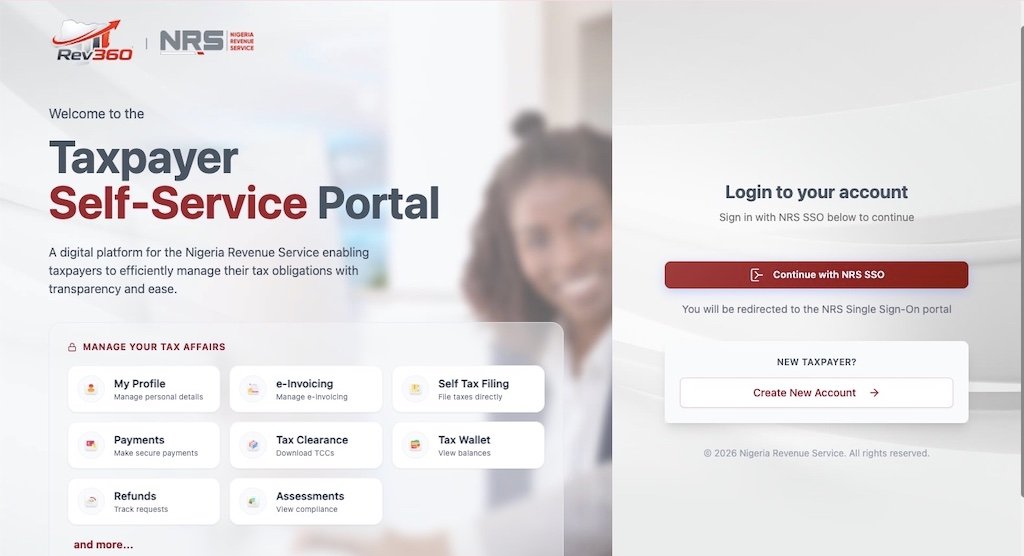
Go to selfservice.nrs.gov.ng. This is the only official portal for federal tax filing. Confirm you are on a secure connection — look for the padlock icon and the .gov.ng domain in your browser bar.
If you had an account on the old FIRS TaxPro-Max platform, your credentials should have migrated. Log in with your existing email and password. If that fails, use the password reset function linked to the email on your Tax ID profile.
First-time users should click “Register” or “Create Account.” You will need your 13-digit Tax ID, a valid email address, and a phone number. The portal sends a verification code to confirm your identity. Complete the registration before the filing deadline — do not leave account setup for the last day.
Step 2: Navigate to the Returns Section
Once logged in, your dashboard shows your taxpayer profile, outstanding obligations, and filing history. Navigate to “File Returns,” “Returns,” or “Annual Returns” (the exact label may vary as the portal evolves). The system displays the return types available based on your taxpayer profile.
For company annual returns, select “Company Income Tax Self-Assessment Return.” For employer PAYE annual summaries, select “PAYE Annual Return.” The portal should indicate the assessment year and the filing deadline for each return type.
Step 3: Complete the Return Form
The return form loads with sections that must be completed sequentially. Here is what to expect:
For Company Income Tax Returns
- Taxpayer details: Your company name, Tax ID, registered address, and accounting year-end. These should auto-populate. Verify them — errors here can cause the return to be filed against the wrong profile or the wrong assessment year.
- Financial summary: Enter turnover, cost of sales, gross profit, operating expenses, and other income. These figures must match your audited financial statements exactly. The NRS will cross-reference your return against the uploaded audited accounts.
- Tax adjustments: Add back non-deductible expenses (entertainment above limits, donations to non-approved bodies, penalties, and fines). Deduct exempt income (franked investment income, for example). The result is your adjusted profit.
- Capital allowances: Enter qualifying capital expenditure and the applicable rates. The system may compute the allowances automatically based on asset categories, or you may need to enter the final figures from your capital allowance schedule.
- Taxable profit and CIT computation: The portal calculates your CIT liability based on the figures entered. For standard companies, the rate is 30%. Small companies (turnover up to ₦50 million, assets under ₦250 million) are taxed at 0%. Verify the rate applied.
- Development levy: If your company is not classified as small and is not a non-resident, include the 4% development levy on assessable profits.
- Tax credits: Enter all WHT credit notes received during the year, instalment payments made, and any other credits. The difference between total liability and total credits is your balance payable.
For Individual PIT Annual Returns (on State Portals)
The structure is similar but simpler. Enter all income from all sources (employment, business, investments, capital gains). Deduct eligible reliefs (pension, rent relief, NHF, NHIS, life insurance). The progressive NTA 2025 tax bands (0% on the first ₦800,000 through 25% above ₦50,000,000) are applied to your chargeable income. Credit your PAYE already deducted by your employer, plus any WHT credits. The balance is what you owe or what is owed to you.
Remember: under the NTAA 2025, every individual must file an annual return — even salaried employees whose PAYE is fully deducted by their employer. This is a change from the old system where many employees assumed their employer handled everything. Your employer files the employer’s PAYE annual return. You file your own individual return separately.
Step 4: Upload Supporting Documents
The portal prompts you to upload documents. For companies, the audited financial statements and tax computation schedules are mandatory. Without them, the return is treated as incomplete — which carries the same penalties as late filing.
Accepted formats are typically PDF, JPEG, and PNG. Keep files under the size limit (usually 5–10 MB per file). Name files clearly: “AuditedAccounts-CompanyName-2026.pdf” is far better than “Scan001.pdf” when the NRS reviews your submission.
Under the NTAA 2025, company returns must be prepared and submitted by an accredited tax practitioner. Returns submitted by unaccredited persons are deemed not filed — even if you uploaded everything correctly and paid on time. Verify your tax agent’s accreditation before engaging them.
Step 5: Review, Submit, and Save Your Reference Number
Before submitting, review every section. Common errors include transposed figures, mismatched income totals between the return form and the uploaded audited accounts, wrong assessment year, and missing deduction entries.
Once you are satisfied, click “Submit.” The portal generates a unique filing reference number and a submission confirmation. Save both immediately — take a screenshot, email it to yourself, and store a copy in your records. The filing reference is your proof of timely filing. If the portal experiences a glitch and your submission is later queried, this number is your defence.
The portal may also generate an assessment notice showing your total liability, credits applied, and balance payable. Review the assessment carefully. If the auto-calculated figures differ from your self-assessment, you have the right to object under the NTAA 2025 — but you must do so within the prescribed period (typically 30 days).
Step 6: Make Payment
If your return shows a balance payable, pay promptly. The portal integrates with these payment channels:
- Remita: The portal generates a Remita Retrieval Reference (RRR). Pay via internet banking, the Remita app, or at any Remita-accepting bank branch.
- Quickteller (Interswitch): Pay by debit card or bank transfer directly through the portal.
- Designated bank branches: Take your RRR to any NRS-designated bank for over-the-counter payment.
After payment, the portal updates your account. Download and save the electronic receipt. This receipt, together with your filing reference, is your compliance record for the year — and the foundation for your Tax Clearance Certificate application.
Companies can apply to pay CIT in up to three instalments, provided the request is made at the time of filing and within six months of the accounting year-end. This can ease cash flow pressure for businesses with large one-off tax bills.
Filing Deadlines at a Glance
| Return Type | Deadline | Filed Where |
|---|---|---|
| Company Income Tax (annual) | Within six months after accounting year-end | NRS portal |
| New company (first return) | 18 months after incorporation or six months after first accounting period (whichever is earlier) | NRS portal |
| Individual PIT (annual) | 31 March of the following year | State IRS portal or office |
| Employer PAYE annual return | 31 January of the following year | State IRS (or NRS for specified categories) |
| VAT return (monthly) | 21st of the following month | NRS portal |
| WHT return (monthly) | 21st of the following month | NRS portal (companies) or State IRS (individuals) |
For the 2026 tax year (January to December 2026): individuals file PIT by 31 March 2027. Companies with a December year-end file CIT by 30 June 2027. Employer PAYE annual returns are due by 31 January 2027.
What Happens After You File
Apply for Your Tax Clearance Certificate
Once your return is filed and all taxes are paid, you can apply for a Tax Clearance Certificate (TCC) through the NRS portal or your State IRS. The TCC confirms you are tax-compliant for the relevant years. You will need it for government contract bids, certain banking transactions, company annual returns at CAC, and other official processes. The TCC typically covers the three most recent assessment years.
Keep Records for Six Years
The NTAA 2025 requires taxpayers to maintain accurate financial and tax records for a minimum of six years. The NRS can audit any year within this period. If fraud or deliberate misstatement is suspected, the NRS can go beyond six years — and under Section 36(2) of the NTAA, an audit that commenced within the limitation period can continue beyond it.
Records to keep include your filed return, filing reference, payment receipts, audited accounts, tax computation workpapers, WHT credit notes, rent documentation, pension statements, and any correspondence with the tax authority.
Watch for Assessment Notices
The NRS may issue a notice of additional assessment if it disagrees with your self-assessment after reviewing your return and supporting documents. If you receive one, do not ignore it. You have the right to object within the statutory timeframe. If you disagree with the assessment, you can appeal to the Tax Appeal Tribunal. Engage a qualified tax adviser promptly if the amounts are significant.
Penalties for Late Filing and Non-Compliance
The NTAA 2025 penalties are designed to hurt enough that compliance is cheaper than non-compliance:
| Offence | Penalty |
|---|---|
| Late filing of annual return | ₦25,000 for the first month, ₦5,000 for each subsequent month |
| Failure to register for tax | ₦50,000 for the first month, ₦25,000 for each subsequent month |
| Failure to keep records | ₦10,000 (individuals) or ₦50,000 (companies) |
| Filing by unaccredited tax agent (companies) | Return deemed not filed — same as not filing at all |
| False or misleading return | Fines up to ₦1,000,000 or imprisonment up to three years, or both |
| Awarding contracts to unregistered persons | ₦5,000,000 |
Late filing penalties accrue monthly until you file. They are separate from late payment penalties, which include interest at the CBN Monetary Policy Rate. Filing on time but paying late is better than not filing at all — the filing penalty stops accruing once the return is submitted, even if payment is still outstanding.
Common Mistakes That Cause Problems
- Filing on the wrong platform. Company CIT returns go to the NRS portal. Individual PIT returns go to your State IRS. Filing on the wrong platform means the correct authority never receives your return, and you are treated as a late filer.
- Waiting until the deadline day. Portal traffic spikes on deadline days. If the system crashes or runs slowly, you still face the late filing penalty. File at least one week before the deadline.
- Submitting without audited accounts (companies). An incomplete return is treated the same as a late return. No audited accounts = incomplete return = penalties. Get your audit done early.
- Using an unaccredited tax agent. Company returns prepared by an unaccredited practitioner are legally deemed not filed. Confirm your agent’s accreditation status with the NRS before engaging them.
- Forgetting the dual PAYE obligation. Under the NTAA 2025, both employers and individual employees must file annual returns. Your employer’s PAYE return does not satisfy your personal filing obligation. You must file your own individual return separately.
- Not claiming all eligible reliefs. Pension, rent relief, NHF, NHIS, and life insurance premiums all reduce your chargeable income. Skipping any of these means you overpay tax. Gather your documentation and claim everything you are entitled to.
- Not saving the filing reference number. The portal generates this on submission. Without it, you have no proof of timely filing. Screenshot it, email it, print it.
- Assuming nil returns are not required. If you had no income or no taxable activity during the year, you must still file a nil return. Not filing because you owe nothing is still an offence.
NRS Self-Service Portal Troubleshooting
The NRS Self-Service Portal is functional but — like most government digital platforms — can be temperamental. Here are solutions for common issues:
- Portal not loading: Clear your browser cache and cookies. Try a different browser (Chrome, Firefox, or Edge). If the issue persists, the portal may be undergoing maintenance — try again outside peak hours (early morning or late evening).
- Login credentials not working: Use the “Forgot Password” option. If your email has changed since registration, you may need to contact NRS support at 02094602700 to update your profile.
- Upload failing: Check your file size (keep under 5 MB) and format (PDF, JPEG, PNG). Compress large PDFs before uploading. If the upload button is unresponsive, try a different browser or disable browser extensions that might block scripts.
- Session timing out: The portal may have a session timeout. If you are filling in a complex return, save your progress frequently if the portal allows partial saves. Alternatively, prepare all your figures in a spreadsheet first and enter them into the portal in one sitting.
- Payment not reflecting: After paying via Remita or Quickteller, the portal may take 24–48 hours to update. Keep your payment receipt and check back after the processing window. If it still does not reflect, contact NRS support with your RRR number and payment receipt.
If technical issues prevent you from filing by the deadline, document everything — screenshots of error messages, timestamps, and any email correspondence with NRS support. This evidence may help if you need to contest a late filing penalty.
Final Thoughts
Filing your annual tax return is the most important compliance action you take each year. It determines your Tax Clearance Certificate status, your standing with the NRS, and your exposure to penalties and audits. The process itself is not complicated — verify your Tax ID, log into the correct portal, enter your figures, upload your documents, submit, and pay. The difficulty is almost always in the preparation, not the filing.
Start early. Get your audit done well before the deadline if you are a company. Gather your rent receipts, pension statements, and WHT credit notes if you are an individual. Verify your tax agent’s accreditation if you use one. And file at least a week before the deadline to avoid the portal traffic crush.
Use our PAYE Calculator to verify employment tax figures, the CIT Calculator for company tax estimates, or the Salary Optimizer to model the most tax-efficient salary structure. For complex filings — multiple income sources, cross-border transactions, or disputed assessments — find an accredited tax professional through our Tax Professional Directory. And for the latest updates on portal functionality and filing requirements, bookmark the official NRS website at nrs.gov.ng.
FAQs About Filing Annual Tax Returns on the NRS Portal
Do individuals file annual returns on the NRS portal?
Most individuals do not. Personal Income Tax annual returns are filed with the State Internal Revenue Service where you reside, not the NRS. The NRS handles individual PIT returns only for military officers, police officers, Nigerian Foreign Service officers, and non-resident persons. If you are a salaried employee, freelancer, or business owner, your state IRS is your filing authority.
When is the deadline for company annual returns?
Companies must file self-assessment CIT returns within six months after the end of their accounting year. A company with a December 2026 year-end must file by 30 June 2027. Newly incorporated companies have 18 months from incorporation or six months after their first accounting period, whichever is earlier.
Can I file a company return myself without a tax agent?
No. Under the NTAA 2025, company tax returns must be prepared and submitted by an accredited tax practitioner. Returns filed by unaccredited persons are legally treated as not having been filed, which means the company is in default even if the return was submitted on time. Verify your agent’s accreditation with the NRS before engaging them.
Do I still need to file if I had no income this year?
Yes. You must file a nil return. Failure to file — even when no tax is owed — is an offence under the NTAA 2025. The late filing penalty of ₦25,000 for the first month and ₦5,000 for each subsequent month applies regardless of whether any tax is due.
What happens if the portal is down on the deadline?
Unfortunately, portal downtime does not automatically extend your deadline. The NRS may exercise discretion in exceptional circumstances, but you should not rely on this. File at least one week before the deadline to avoid this risk. If you do experience a technical failure on the deadline, document it thoroughly with screenshots and timestamps, and contact NRS support at 02094602700 immediately.
How do I get my Tax Clearance Certificate after filing?
Once your return is filed and all taxes are paid, apply for a TCC through the NRS portal (for company TCC) or your State IRS (for individual TCC). The TCC confirms your compliance for the three most recent assessment years. It is required for government contract bids, CAC annual returns, and certain banking transactions.
Can I pay my Company Income Tax in instalments?
Yes. Companies may apply to pay CIT in up to three instalments, provided the application is made at the time of filing and within six months of the accounting year-end. The request must be included in the return submission — you cannot retrospectively split a lump sum payment that has already been assessed.



Join the Conversation
Be the first to share your thoughts on this article.