A beginner-friendly walkthrough for e-filing your annual return using the new Nigeria Revenue Service platform.
Here’s a step-by-step guide to filing your tax return on the Nigeria Revenue Service portal. Deadlines, documents needed, payment options, and penalties explained.
If you need to submit your tax return on the NRS portal, the process has changed since January 2026. The Nigeria Revenue Service (NRS) replaced the Federal Inland Revenue Service (FIRS) as part of the 2025 tax reform, and the old TaxPro-Max filing system has been migrated to a new Self-Service Portal at selfservice.nrs.gov.ng.
Whether you are filing as an individual, a company, or an employer remitting PAYE, this guide walks you through the entire process — from getting your Tax ID to making payment and downloading your receipt.
| Detail | Summary |
|---|---|
| Filing portal | selfservice.nrs.gov.ng (NRS Self-Service Portal) |
| Tax ID portal | taxid.nrs.gov.ng (for retrieving or generating your 13-digit Tax ID) |
| Company filing deadline | Within six months after the end of the accounting year |
| Individual filing deadline | 31 March of the year following the assessment year |
| Monthly PAYE remittance | Within 10 days of the following month |
| Payment channels | Remita, Quickteller, designated banks via the portal |
Before You Start: What You Need To Submit Your Tax Return
Before you sit down to file, gather everything you will need. Trying to file without these documents ready leads to abandoned returns, errors, and missed deadlines. Here is the full checklist:
Your 13-Digit Tax ID
Under the Nigeria Tax Administration Act 2025 (NTAA), every taxable person must have a Tax Identification Number. The system has been simplified since January 2026. For individuals, your National Identification Number (NIN) now serves as your Tax ID. For businesses, your CAC registration number (RC or BN number) serves as your Corporate Tax ID.
If you are not sure whether your Tax ID is active, visit the NRS Tax ID Portal at taxid.nrs.gov.ng. Select the “Individual” or “Corporate” tab, enter your NIN or CAC number, and the system will confirm your 13-digit Tax ID and its status. If your record shows as unverified, you may need to visit your State Internal Revenue Service or the nearest NRS office with valid identification to resolve the issue.
A verified Tax ID is now required for maintaining bank accounts, bidding for government contracts, and — critically — filing returns on the NRS portal. You cannot proceed without one.
Supporting Documents
The documents you need depend on your taxpayer category:
For salaried individuals (PAYE employees):
- Annual payslips or salary schedule from your employer
- Evidence of PAYE deductions made during the year
- Rent receipts or tenancy agreement (if claiming rent relief)
- Pension contribution statements
- NHF and NHIS contribution evidence
- Details of any additional income (freelance work, investments, rental income)
For self-employed individuals and sole traders:
- Statement of income and expenditure for the year
- Business bank account statements
- Invoices and receipts for business expenses
- Evidence of any tax already paid (withholding tax credit notes)
- Capital allowance schedules (if claiming depreciation on business assets)
For companies:
- Audited financial statements (balance sheet and profit-and-loss account) signed by an ICAN-licensed auditor
- Tax computation schedules showing taxable profits and allowable deductions
- Capital allowance schedules
- Evidence of all tax payments made during the year (WHT, VAT, PAYE remittances)
- Transfer pricing documentation (if applicable)
- Schedule of related-party transactions
If any of these figures are unclear, use our PAYE Calculator or CIT Calculator to cross-check your numbers before filing.
Step 1: Access the NRS Self-Service Portal
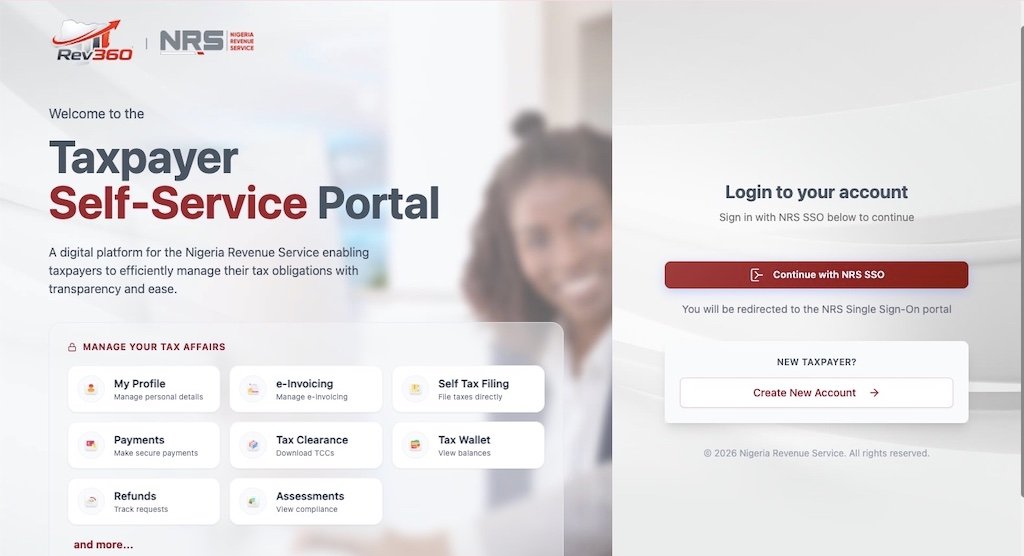
Open your browser and go to selfservice.nrs.gov.ng. This is the official NRS Self-Service Portal — the only platform for filing federal tax returns electronically. Make sure you are on a secure connection (look for the padlock icon and the .gov.ng domain). Do not use third-party sites claiming to offer NRS filing services.
If you already had an account on the old FIRS TaxPro-Max platform, your login credentials should have been migrated. Try logging in with your existing email and password. If that does not work, use the “Forgot Password” option to reset your credentials using the email address linked to your Tax ID.
If you are a first-time user, click “Register” or “Sign Up” and follow the prompts. You will need your 13-digit Tax ID, a valid email address, and a phone number. The system will send a verification code to confirm your identity.
Step 2: Select the Correct Return Type
Once logged in, navigate to the “File Returns” or “Returns” section of the dashboard. The portal will display the return types available based on your taxpayer profile. The main return types you will encounter include:
- Company Income Tax (CIT) Return — for registered companies filing annual self-assessment returns
- Personal Income Tax (PIT) Return — for individuals filing annual returns (including self-employed persons)
- PAYE Annual Return — filed by employers summarising all PAYE deductions for the year (note: under the NTAA 2025, both employers and employees must file annual PAYE returns)
- Value Added Tax (VAT) Return — monthly return for VAT-registered businesses
- Withholding Tax (WHT) Return — for entities that deduct WHT and must remit to the NRS
Select the return type that matches your obligation. If you are unsure which return applies to you, our AI Tax Assistant can help you identify your filing obligations based on your specific situation.
Step 3: Complete the Return Form
The portal will load the relevant return form. Fill in each section carefully. Most forms follow a similar structure:
- Section A — Taxpayer Information: Your Tax ID, name, address, and contact details. These should auto-populate from your registration. Verify that the details are correct — particularly your registered address, as this determines which tax authority processes your return.
- Section B — Income Details: Enter your income figures for the assessment year. For individuals, this includes employment income, business income, investment income, and any other taxable income. For companies, this includes turnover, gross profit, and other income streams. Ensure these figures match your audited accounts or income statements.
- Section C — Deductions and Reliefs: Enter all allowable deductions. For individuals, this covers pension contributions, rent relief, NHF, NHIS, and life insurance premiums. For companies, this includes allowable business expenses, capital allowances, and any loss brought forward from prior years.
- Section D — Tax Computation: The portal may auto-calculate your tax liability based on the figures entered, or it may require you to input your own computation. Double-check the tax bands applied — the NTA 2025 bands (0% on the first ₦800,000 for individuals, 30% CIT rate for companies) must be used for the 2026 tax year onwards.
- Section E — Tax Payments and Credits: Enter details of any tax already paid during the year. This includes PAYE deducted by your employer, withholding tax credits, and any instalment payments made. The difference between your total liability and credits already paid is your balance due (or refund owed).
Step 4: Upload Supporting Documents
The portal will prompt you to upload supporting documents. At minimum, companies must upload audited financial statements and tax computation schedules. Individuals should upload evidence of income, deductions, and tax payments.
Accepted file formats are typically PDF, JPEG, and PNG. Keep file sizes reasonable — large scans can cause upload failures. Name your files clearly (for example, “Audited-Accounts-2026.pdf” or “Rent-Receipt-2026.pdf”) so that the reviewing officer can identify them easily.
Under the NTAA 2025, returns filed without the required documents may be treated as incomplete. Incomplete returns can attract the same penalties as late filing, so do not skip this step.
Step 5: Review and Submit
Before hitting “Submit,” review every section of your return. Check for common errors: transposed figures, wrong Tax ID, mismatched income totals, or missing deduction entries. Once submitted, the portal generates a unique filing reference number. Save this number — it is your proof of filing and you will need it for payment and for requesting your Tax Clearance Certificate later.
The portal may also generate an assessment notice showing your tax liability. This is the official figure you owe (or are owed as a refund). If you disagree with an auto-generated assessment, you have the right to object under the NTAA 2025 — but you must do so within the prescribed timeframe.
Step 6: Make Payment
If your return shows a balance due, you need to pay. The NRS portal integrates with multiple payment channels:
- Remita: The portal generates a Remita Retrieval Reference (RRR) number. Use this to pay via internet banking, the Remita app, or at any bank branch that accepts Remita payments.
- Quickteller (Interswitch): Pay using your debit card or bank transfer directly through the portal’s Quickteller integration.
- Designated bank branches: If you prefer to pay in person, take your RRR number and filing reference to any NRS-designated bank. The bank processes the payment and issues a receipt.
After payment, the portal updates your account to reflect the payment. Download and save your electronic receipt. This receipt, combined with your filing reference number, forms the basis of your compliance record for the year.
Companies may apply to pay CIT in up to three instalments if they file within six months of their accounting year-end. This must be requested at the time of filing — you cannot retrospectively split a lump sum payment.
Filing Deadlines You Must Know
Missing a deadline is one of the most expensive mistakes in Nigerian tax compliance. Here are the key deadlines under the NTAA 2025:
| Return Type | Deadline |
|---|---|
| Company Income Tax (annual) | Within six months after the end of the accounting year |
| Newly incorporated company (first return) | Within 18 months of incorporation or six months after first accounting period (whichever is earlier) |
| Personal Income Tax (annual) | 31 March of the year following the assessment year |
| PAYE monthly remittance | Within 10 days of the month following deduction |
| PAYE annual return (employer) | 31 January of the following year |
| VAT return (monthly) | 21st of the month following the transaction |
| WHT remittance | 21st of the month following the deduction |
For the 2026 tax year (January to December 2026), individual taxpayers must file their annual PIT return by 31 March 2027. Companies with a December year-end must file by 30 June 2027.
Penalties for Late Filing and Non-Compliance
The NTAA 2025 significantly stiffened penalties compared to the old regime. Here are the key ones to watch:
| Offence | Penalty |
|---|---|
| Failure to register for tax | ₦50,000 for the first month, ₦25,000 for each subsequent month |
| Late filing of returns | ₦25,000 for the first month, ₦5,000 for each subsequent month |
| Failure to keep records | ₦10,000 (individuals) or ₦50,000 (companies) |
| Failure to deduct tax at source | 40% of the amount not deducted |
| Failure to remit tax deducted | Amount owed + 10% per annum + interest at CBN Monetary Policy Rate |
| Failure to use electronic fiscal system | ₦200,000 + 100% of tax due + interest at CBN rate |
For serious offences like failure to remit tax deducted at source, conviction can carry imprisonment of up to three years, or a fine of the principal amount plus up to 50% penalty, or both. These are not theoretical threats — the NRS has the power to garnish bank accounts, apply liens, and prosecute defaulters.
Filing Tips for Different Taxpayer Types
For Salaried Employees
If your only income is employment income and your employer deducts PAYE correctly, your annual filing obligation is straightforward. You still need to file an annual return to confirm the PAYE deductions were accurate and to claim any additional reliefs (like rent relief) that your employer may not have factored in. Under the NTAA 2025, employees now have a dual reporting obligation — your employer files the employer’s PAYE return, and you file your individual return.
Make sure your payslips match the figures your employer reported. If there is a discrepancy — for example, if your employer under-deducted PAYE — you are still responsible for paying the shortfall. Check your figures with our PAYE Calculator to spot any gaps before filing.
For Self-Employed Individuals and Freelancers
Self-employed persons file with the State Internal Revenue Service (SIRS) in the state where they reside or carry on business, not directly with the NRS. However, if you are VAT-registered or have withholding tax obligations, those returns go to the NRS portal.
Your annual PIT return must include all income from all sources — consulting fees, rental income, investment returns, and digital asset gains. The NTA 2025 explicitly taxes income from freelance work, crypto trading, and digital content creation. Declare everything. The NRS’s digital tools can cross-reference bank account activity against declared income.
For Companies
Companies file self-assessment returns on the NRS portal. The return must be accompanied by audited financial statements signed by an ICAN-licensed auditor. Returns filed without audited accounts are treated as incomplete.
A critical point under the NTAA 2025: returns submitted by unaccredited tax practitioners are deemed not filed. Only accredited tax agents registered with the NRS can prepare and submit company returns on your behalf. If your accountant or tax adviser is not accredited, the return does not count — even if you submitted it on time.
Small companies (annual turnover of ₦50 million or less, fixed assets under ₦250 million) are exempt from CIT and may be eligible to file simplified returns. Check your classification carefully — the thresholds changed under the NTA 2025.
For Employers Filing PAYE Returns
Employers must remit PAYE deductions monthly — within 10 days of the month following deduction. The annual PAYE return summarising all deductions for the year is due by 31 January of the following year.
The annual return must list every employee, their Tax ID, gross pay, deductions, and net PAYE for the year. Any discrepancy between your monthly remittances and the annual summary will trigger queries from the NRS or the relevant SIRS. Use payroll software that generates NRS-compatible schedules to avoid manual reconciliation headaches.
What to Do After Filing
Filing your return is not the end of the process. Here is what comes next:
- Save your filing reference and payment receipt. Store them digitally and keep a physical copy. You will need them if the NRS queries your return or when you apply for a Tax Clearance Certificate (TCC).
- Apply for your Tax Clearance Certificate. Once your return is filed and all taxes are paid, you can apply for a TCC through the NRS portal. The TCC is required for government contracts, certain banking transactions, and other official processes.
- Keep records for at least six years. The NTAA 2025 requires taxpayers to maintain accurate financial records for a minimum of six years. The NRS can audit you for any year within this period — and beyond six years if fraud or deliberate misstatement is suspected.
- Monitor for assessment notices. The NRS may issue a notice of assessment if it disagrees with your self-assessment. You have the right to object within the prescribed period. If you receive one, do not ignore it — respond promptly and seek professional advice if the figures are disputed.
Common Mistakes to Avoid
- Filing on the wrong portal. Federal tax returns (CIT, VAT, WHT, petroleum taxes) go to the NRS portal at selfservice.nrs.gov.ng. State personal income tax returns go to your State IRS e-tax portal. Filing on the wrong platform means your return is not received by the correct authority.
- Using an unaccredited tax agent. Under the NTAA 2025, returns submitted by unaccredited practitioners are treated as not filed. Verify your tax agent’s accreditation status before engaging them.
- Missing the dual PAYE obligation. Both employers and employees must now file annual PAYE returns. Many employees assume their employer handles everything — that is no longer the case under the new law.
- Forgetting to claim rent relief. If you pay rent and have documentation, claim the relief (20% of rent, max ₦500,000) on your return. Leaving it out means you overpay PAYE unnecessarily.
- Submitting without audited accounts (companies). The NRS requires audited financial statements signed by an ICAN-licensed auditor. Submitting unaudited accounts renders your return incomplete.
- Not saving the filing reference number. Without this number, you have no proof of filing. If the portal experiences issues and your submission is lost, the reference number is your only protection.
What If You Have Problems With the Portal?
The NRS portal, like any government digital platform, can experience downtime or technical issues — particularly close to filing deadlines when traffic spikes. Here are practical solutions:
- Try filing early. Do not wait until the last day. If the portal goes down on the deadline date, you still face penalties for late filing. Give yourself at least a week’s buffer.
- Clear your browser cache. If the portal is not loading correctly, try clearing your cache and cookies, or switch to a different browser (Chrome, Firefox, and Edge all work).
- Contact NRS support. The NRS helpline is 02094602700. You can also reach them through their official website at nrs.gov.ng. If you experience a technical issue that prevents filing, document it (screenshots, timestamps) in case you need to explain a late submission.
- Use a tax professional. If you are struggling with the portal or unsure about any aspect of your return, engage an accredited tax practitioner. They file returns regularly and can navigate the portal efficiently. Find one through our Tax Professional Directory.
Final Thoughts
Filing your tax return on the NRS portal is more straightforward than it sounds — particularly for employees whose primary income is PAYE. The process is: get your Tax ID, log in to selfservice.nrs.gov.ng, select the right return type, enter your figures, upload your documents, submit, and pay. The NRS has consolidated everything into a single digital workflow, which is a genuine improvement over the old system.
Where people get tripped up is not the filing itself but the preparation. Missing documents, unverified Tax IDs, and wrong portal choices account for most of the frustration. Get your documents together before you start, verify your Tax ID in advance, and give yourself time before the deadline.
Use our free PAYE Calculator to verify your income tax figures, the VAT Calculator to check your VAT liability, or the CIT Calculator if you are filing a company return. If your situation is complex or you want someone to handle the filing for you, browse our Tax Professional Directory for accredited practitioners across Nigeria.
FAQs About Submitting Tax Returns on the NRS Portal
What is the NRS Self-Service Portal?
The NRS Self-Service Portal at selfservice.nrs.gov.ng is the official online platform for filing federal tax returns in Nigeria. It replaced the old FIRS TaxPro-Max system as part of the 2025 tax reform. You can file CIT, VAT, WHT, and other federal returns, make payments, and track your compliance status through the portal.
Do I need a Tax ID to file a return?
Yes. A 13-digit Tax Identification Number is mandatory for filing. Under the NTAA 2025, your NIN serves as your individual Tax ID, and your CAC number serves as your corporate Tax ID. You can verify or retrieve your Tax ID at taxid.nrs.gov.ng. Without a verified Tax ID, you cannot access the filing portal.
When is the deadline for individual tax returns?
Individual taxpayers must file their annual Personal Income Tax return by 31 March of the year following the assessment year. For the 2026 tax year, the deadline is 31 March 2027. Late filing attracts a penalty of ₦25,000 for the first month and ₦5,000 for each subsequent month of default.
Do employees still need to file if their employer deducts PAYE?
Yes. The NTAA 2025 introduces a dual PAYE reporting obligation. Your employer files the employer’s annual PAYE return, and you must file your own individual annual return confirming the PAYE figures and claiming any additional reliefs you are entitled to. This is a change from the old system where many employees relied entirely on their employers.
What payment methods does the NRS portal accept?
The portal supports payment through Remita (via internet banking, the Remita app, or bank branches), Quickteller by Interswitch (debit card or bank transfer), and direct payment at NRS-designated bank branches using your Remita Retrieval Reference (RRR) number generated by the portal.
Can I file my company return myself, or do I need a tax agent?
Under the NTAA 2025, company tax returns must be prepared and submitted by an accredited tax practitioner. Returns filed by unaccredited persons are legally treated as not having been filed, even if they are submitted on the portal. Individual returns can be filed by the taxpayer directly.
What happens if I cannot pay the full amount at once?
Companies may apply to pay Company Income Tax in up to three instalments if the request is made at the time of filing, within six months of the accounting year-end. For other tax types, contact the NRS to discuss a payment arrangement. Filing your return on time — even if you cannot pay immediately — avoids the late-filing penalty, which is separate from the late-payment penalty.




Join the Conversation
Be the first to share your thoughts on this article.